One workspace for dispatch and brokered freight.
Fleet dispatchers, owner-operator dispatch companies, and brokers share the same board: assign loads, update status, and cover a hub posting in-app. Ask Otto in chat or by voice — writes and calls wait for your confirm. A check call on a booked load is logged when you confirm; email or text waits for a second confirm. Invite the desk into one workspace. Unified multi-board search, automatic routing, document extraction, and multi-MC brokerage mode are still coming soon.
Shipped
Shipped
Shipped

Sample data. The real hub card on the labeled demo board — not a customer workspace or a live load board.
Available in a paying workspace today
Board
Assign and update status on fleet or brokered loads
Shipped
Team
Shared workspace for dispatchers and broker desks
Shipped
Otto
Chat and Quo voice — confirm before a write or call
Shipped
Trip plan
Chain loads yourself. Stop order is not auto-optimized
Shipped
Live in the workspace. Labeled when it is not.
Built for fleet dispatchers, owner-operator dispatch companies, and freight brokers. A capability is listed as available only when a paying workspace can use it without a load-board login. DAT search is the exception: the screen is there, and it runs after you connect credentials. Broker-only mode and everything else marked Coming soon are not in the product.
AI Load Hub
A hub for freight already in the workspace.
Carriers and brokers review imported postings and score the rows already in the workspace. DAT search runs only after server credentials are connected, and results stay in that workspace. A live search across 15+ boards is not shipping.
Workspace hub and profit score
Imported rows and pulled DAT postings show on the hub with a profit score. With nothing imported, the board is a labeled demo set — not live freight.
DAT searchNeeds credentials
Search DAT from the hub when DAT credentials are set on the server. Truckstop and 123Loadboard are not connected.
Unified 15+ board searchComing soon
One query across every load board and broker portal is a product goal, not a live connection.
AI rate negotiationComing soon
Otto does not email brokers or negotiate rates. Counteroffers and tracked reply threads are on the roadmap.
Load Radar alertsComing soon
Saved searches that ping you when a matching load posts are not built yet.
Dispatch board and Otto
The same board for a fleet or a broker desk.
Assign a driver and move status yourself, including brokered loads. Covering a hub posting onto the board stays in-app. Otto can propose those actions in chat, a document field you confirm, a check-call log, or a Quo voice call — nothing is written, dialed, or sent until you confirm. A separate multi-MC brokerage mode is not live.
Dispatch board
Fleet dispatch and broker ops share this board. Assign a driver, update status, and cover a hub posting onto the board in-app. Suggestions rank equipment, availability, and home-base deadhead. You tap assign. HOS is not synced, and nothing assigns itself.
Otto chat and Quo voice
Ask in plain language. Otto can propose an assignment, a status change, a check-call log, or an outbound call. Confirm is required before the write or the call. A check-call text or email is a second confirm.
Team workspace
Invite fleet dispatchers or broker ops into the company workspace. Admins can list pending invites and revoke the ones that have not been used.
Multi-MC brokerage modeComing soon
Broker desks can run brokered loads in this workspace today. A separate multi-MC brokerage workspace is not shipping.
Document AI
Rate confirmations, BOLs, and PODs can be read from text in the file, or from a photo when an xAI key is set. You confirm before a field overwrites the load.
Check calls
Pickup, in-transit, and delivery updates are suggested from the schedule and logged when you confirm. Email or Quo goes out only after a second confirm.
Route Optimizer
Chain the trip. You keep the stop order.
Paying workspaces can chain loads into a trip plan and estimate miles from stored miles or a built-in city table. Automatic optimization, live disruption monitoring, and spot-market backhaul matching are still on the roadmap.
Workspace trip plan
Chain dispatch loads in Route Optimizer. Stop order is yours — it does not auto-optimize around windows, HOS, or equipment.
Invoices from a rate confirmation
Copy broker, rate, reference, and stops from a Confirmly rate confirmation onto an invoice. It does not collect payment or email the broker.
Route ForgeComing soon
Optimized multi-stop trips with fuel stops planned in are not built. The trip plan does not reorder stops for you.
Spot Match backhaulsComing soon
Live return freight from the spot market is not matched when a truck unloads. Nearby suggestions only use loads already in the workspace.
Dispatch CopilotComing soon
Live delay and HOS monitoring with a recommended fix is not shipping.
Fleet scorecardsComing soon
Profitability, on-time, and utilization scorecards by driver, lane, and truck are not shipping.
The screens a dispatcher actually uses.
Four steps that ship in a paying workspace. These frames are the product UI on sample data — fictional lanes, brokerages, and drivers. They are not a customer workspace.
Step 1
Review the hub
Cards already in the workspace show an Otto score and a short why. Ask Otto, or propose Bid or Book — those actions wait for Confirm. The frame here is the labeled demo board, not a live search. DAT search runs only after server credentials are connected. Truckstop and 123Loadboard are not connected.
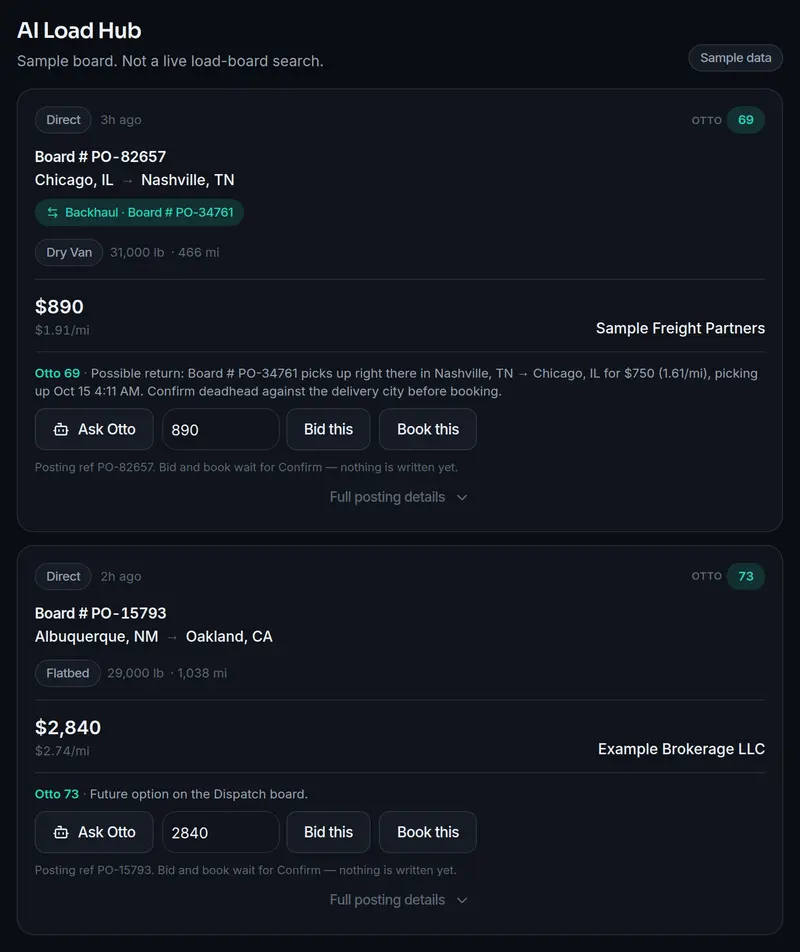
Sample data. Sample data. Not a customer workspace or a live load board. Step 2
Confirm before anything is written
Otto proposes the action and stops. Confirm writes an in-app note, or sends a DAT bid only when DAT bid is configured. Cancel writes nothing. Chat and Quo voice use the same confirm step.
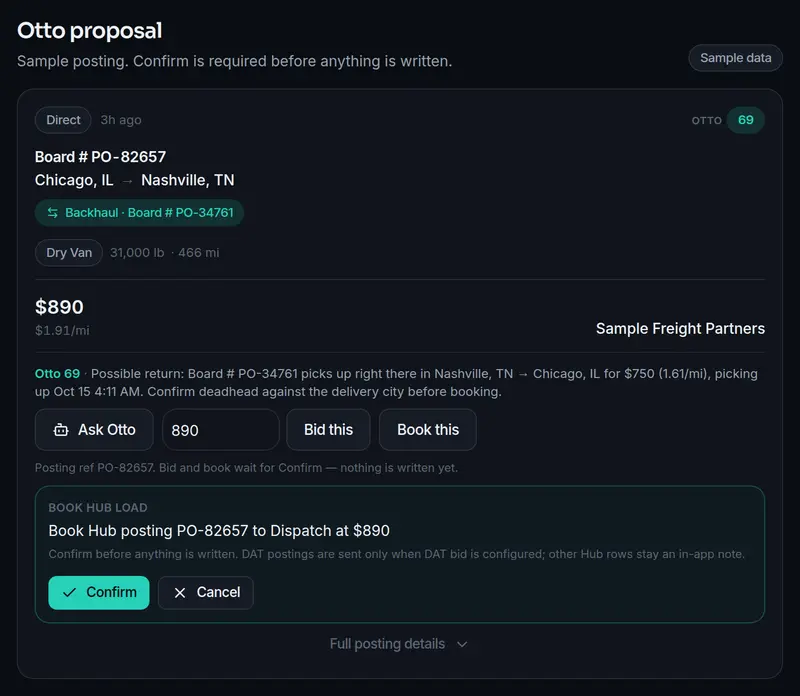
Sample data. Sample posting. Nothing is written until Confirm. Step 3
Check a booked load
Check Calls opens that booked load. You write the pickup, in-transit, or delivery update. Saving logs the note and can move status. Email or a Quo text stays pending until a second confirm.
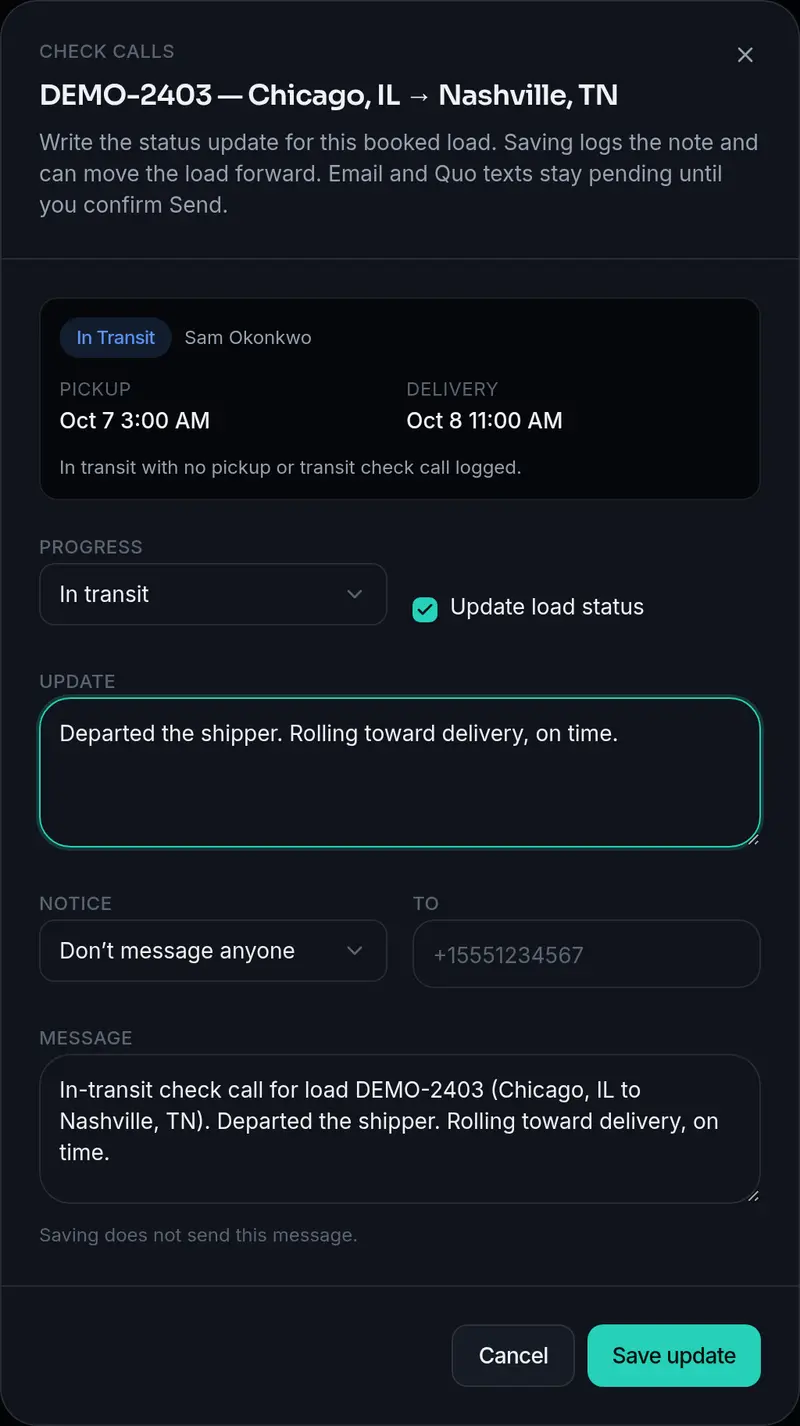
Sample data. Sample driver and brokerage. No phone number is shown or dialed. Step 4
Work the dispatch board
Fleet loads and brokered freight use this board. Assign a driver or move status yourself. Suggestions rank equipment, availability, and home-base deadhead. HOS is not synced, and nothing assigns itself.
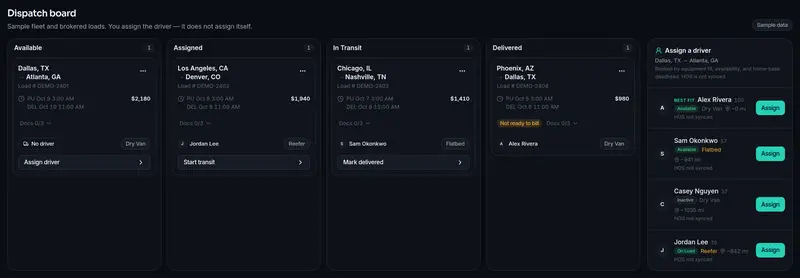
Sample data. Sample data from the interactive demo roster.


Ready to run your own workspace?
Create an account and check out on Starter or Growth, or compare plans first. The interactive demo stays on sample data until you do.
Checked only where LoadPilot is live.
The first three columns describe what that kind of tool usually covers. In the LoadPilot column, a check means a paying workspace can use it without a load-board login. Connect means the DAT screen is there and runs after you add credentials. Soon is not shipping.
| Capability | AI load board | Voice dispatch app | Route optimizer | LoadPilot AI |
|---|---|---|---|---|
| Unified search across 15+ boards | Soon | |||
| DAT search in this workspace | Connect | |||
| AI rate negotiation | Soon | |||
| Voice and chat dispatch assists | ||||
| Dispatch board for fleet and brokered loads | ||||
| Multi-MC brokerage workspaces | Soon | |||
| Automatic driver assignment | Soon | |||
| Manual multi-stop trip plan | ||||
| Automatic route optimization | Soon | |||
| Backhaul / spot-market matching | Soon | |||
| Document read (confirm before overwrite) | ||||
| Check calls (confirm before send) | ||||
| Real-time fleet and HOS tracking | Soon | |||
| Fleet profitability scorecards | Soon |
One workspace for fleets and broker desks.
Starter and Growth are Stripe Checkout for fleets and owner-operator dispatch companies, priced per truck. Brokerages is a custom contract via sales — not Stripe Checkout. Coming soon items, including multi-customer brokerage mode, are not live. DAT search needs credentials you connect.
Starter
For owner-operators and small fleets getting off spreadsheets.
6-month prepaid — $539.94 billed upfront per truck (not monthly).
Get started- Team workspace for dispatchers and broker desks
- Dispatch board for fleet and brokered loads — assign and status
- Otto chat and Quo voice (confirm before write or call)
- Manual trip plan in Route Optimizer
- AI Load Hub for rows already in the workspace
- DAT search when you connect credentialsNeeds credentials
- Invoices from a rate confirmation
- Team invites — list and revoke unused invites
- Cover a hub posting onto the board (in-app)
- Driver and truck roster
- Document read for rate cons, BOLs, and PODs
- Check calls — confirm before send
- Email support
Growth
The same carrier workspace as Starter, billed monthly, with priority support.
Billed monthly per truck (recurring). Cancel anytime in Stripe.
Subscribe- Everything in Starter
- Priority support
- Full AI Load Hub (15+ boards) + Load RadarComing soon
- AI rate negotiationComing soon
- Route Forge + Spot Match backhaulsComing soon
Brokerages
For freight brokerages covering loads with a team.
Custom contract via sales — not self-serve checkout.
Talk to sales- Team workspace for broker ops
- Board for brokered loads — assign and status
- Cover a hub posting onto the board (in-app)
- Otto chat and Quo voice (confirm before write or call)
- AI Load Hub for rows already in the workspace
- DAT search when you connect credentialsNeeds credentials
- Invoices from a rate confirmation
- Multi-customer / multi-MC brokerage workspacesComing soon
- AI rate negotiationComing soon
- Unified 15+ board search and Load RadarComing soon
Fleet
For fleets and dispatching companies running multiple MCs.
Custom contract via sales — not self-serve checkout.
Talk to sales- Everything in Growth
- Dispatch Copilot + fleet scorecardsComing soon
- Multi-MC / brokerage workspacesComing soon
- Autonomous dispatch modeComing soon
- Dedicated onboarding & API accessComing soon
- SLA-backed supportComing soon
Prefer a walkthrough? Contact sales at sales@loadpilotai.com.
Fleet dispatch and broker ops, one workspace.
For fleet dispatchers, owner-operator dispatch companies, and freight brokers. The interactive demo uses sample data — it is not a live customer workspace. Create an account and choose Starter or Growth when you are ready to run your own.